NewNectraUI 1.0 for Pterodactyl 1.15.1

The Pterodactyl panel your customers will actually enjoy.

NectraUI is a HeroUI theme for Pterodactyl 1.15.1 with a live theme manager, dark and light mode, eight languages, and fourteen addons sold separately.

Demo login demo / demo

panel.nectraui.com
NectraUI dashboard in light mode with announcements and a help card

NectraUI in numbers

Addons
14
Languages
8
Bundled fonts
10
Presets
6
Pterodactyl
1.15.1

Every screen, reworked.

Every client page is rebuilt on HeroUI, shipped pre-built, and shaped by the same theme manager. These are the ones people spend their day in.

  • Dashboard screen in the NectraUI panel

    Dashboard

    Server cards with live resource readouts, egg banners and a greeting.

  • Console screen in the NectraUI panel

    Console

    Power controls, the live log, a command line and resource graphs on one screen.

  • File manager IDE screen in the NectraUI panel

    File manager IDE

    Tabs, syntax colouring and a save button, without leaving the panel.

  • Theme manager screen in the NectraUI panel

    Theme manager

    Edit the palette and watch the real panel update in the preview frame.

  • Player Manager screen in the NectraUI panel

    Player Manager

    Who is online right now, actions on a name, and a daily record.

  • Minecraft versions screen in the NectraUI panel

    Minecraft versions

    Every fork, version and build in one list, switched with one click.

  • Plugins screen in the NectraUI panel

    Plugins

    Modrinth, Hangar, SpigotMC and CurseForge searched from the server page.

  • Bedrock config screen in the NectraUI panel

    Bedrock config

    server.properties, experiments and game rules as guided fields.

01 / 08

Fourteen addons, one folder drop each.

Every addon is a separate purchase. Its interface already ships inside the theme, dormant until the addon is installed, so adding one is copying a folder into app/Addons and running php artisan optimize:clear. No frontend build, no core file edits, no licence key.

File Manager

Search, folder upload, trash bin, and an IDE mode with tabs.

Minecraft Version Manager

Move a server to another fork, version and build, with build lists, cleanup options and EULA in one dialog.

Egg Changer

Let a user switch to an approved egg and reinstall.

Plugin Installer

Modrinth, Hangar, SpigotMC and CurseForge in one place.

Mod Installer

Modrinth and CurseForge, filtered by mod loader.

Modpack Installer

Modrinth, CurseForge and Feed the Beast packs.

Bedrock Addon Installer

Upload behaviour and resource packs, switched on in the world.

Bedrock Config Editor

server.properties, experiments and game rules, guided.

Player Manager

Who is online now, actions on them, and a daily record.

Subdomain Manager

A subdomain per server with DNS kept in step.

Server Importer

Pull a server in over SFTP, FTP or from an archive.

Permission Management

Named admin roles fenced to the areas you choose.

Admin Logs

Every admin change, who made it, and from where.

Command History

Console commands follow the user to any machine.

Works with

  • Modrinth
  • CurseForge
  • Hangar
  • SpigotMC
  • Feed the Beast
  • Cloudflare
  • Java Edition
  • Bedrock Edition
  • Paper
  • Purpur
  • Fabric
  • Quilt
  • Forge
  • NeoForge
  • Velocity

These are the platforms the addons talk to. All product names and logos belong to their respective owners.

Three choices, not six presets.

The shell shape, the surface material and the background are set one at a time and none of them depends on the others. Every panel below is the same theme with a different answer to each.

  • Shell shape

    Where the sidebar and the page bar sit, and whether they touch the window edges.

    Attached
    Welded to the window edges. This is the default.
    Floating
    Every piece is a rounded panel, held 12 px off the edges.
    Topbar
    The bar spans the full width and the sidebar sits under it.
  • Surface material

    What a card, a sidebar or a bar is made of. It applies to every surface at once.

    Off
    Solid colour, nothing shows through.
    Subtle
    Short blur, a hint of what passes behind.
    Frosted
    Deep blur, colour and light carry through.
    Custom
    Your own blur, opacity and saturation on three dials.
  • Background

    What sits behind every page. There are two states, and one of them is nothing at all.

    A photo
    Uploaded once, then damped with a wash slider and a blur slider until the text still reads.
    Nothing
    No image. The page is a flat colour, which is a look plenty of operators want.

Three more, on the same terms

  • Nav item style: tint, solid or line for the page you are on.
  • Server card shape: row, tile, panel or compact.
  • Mode: dark and light, with a switcher you can hand to users.

Three shells, four materials, a background or none, three nav styles, four card shapes, two modes. That is 576 panels out of those six controls alone, before a slider moves.

Six of them, from real panels

See the demo settings
  • A NectraUI panel with the sidebar welded to the left window edge, solid dark surfaces and one full width server row
    • ShellAttached
    • MaterialOff
    • BackgroundNone
    • ModeDark

    The default frame, no glass

    Nothing shows through and there is no image behind. Each surface paints once, which is the cheapest the panel ever runs.

  • A NectraUI panel with a bar across the full width above the sidebar, solid dark surfaces and a line marking the selected sidebar item
    • ShellTopbar
    • MaterialOff
    • BackgroundNone
    • ModeDark

    Same surfaces, different frame

    The page bar runs the full width with the sidebar underneath. Only the shell changed from the panel before it.

  • A NectraUI panel with a floating rounded sidebar and topbar, frosted surfaces and a tile server card, in dark mode
    • ShellFloating
    • MaterialFrosted
    • BackgroundNone
    • ModeDark

    Rounded panels and deep blur

    Floating pulls every piece off the window edges, and frosted carries colour and light through the surfaces. Cards are tiles here rather than rows.

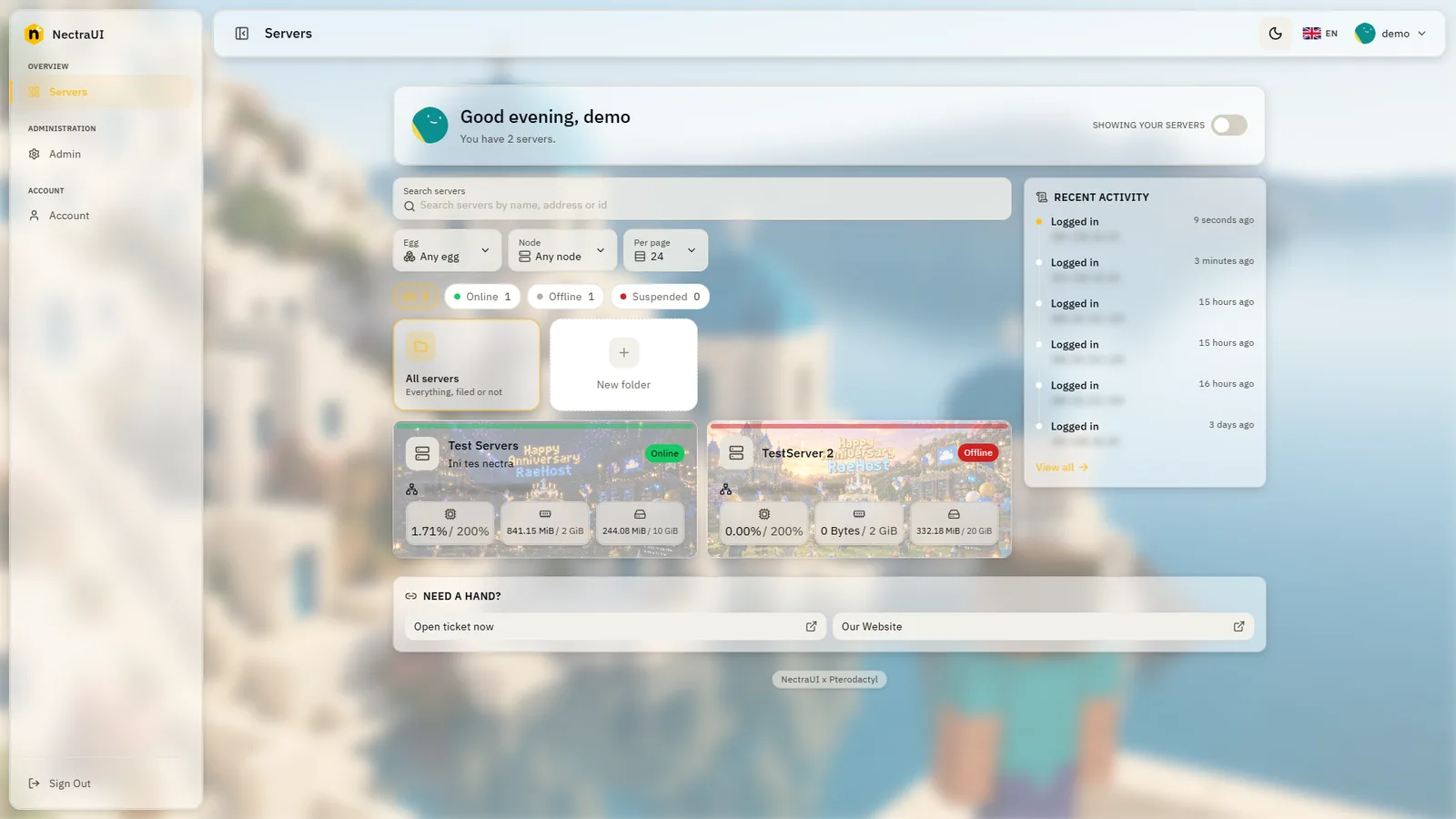
  • The same floating frosted NectraUI panel in light mode, with a cream page, pale surfaces and dark text
    • ShellFloating
    • MaterialFrosted
    • BackgroundNone
    • ModeLight

    The same panel, in light

    Mode is its own switch. The shell, the material and the cards are the ones above, untouched.

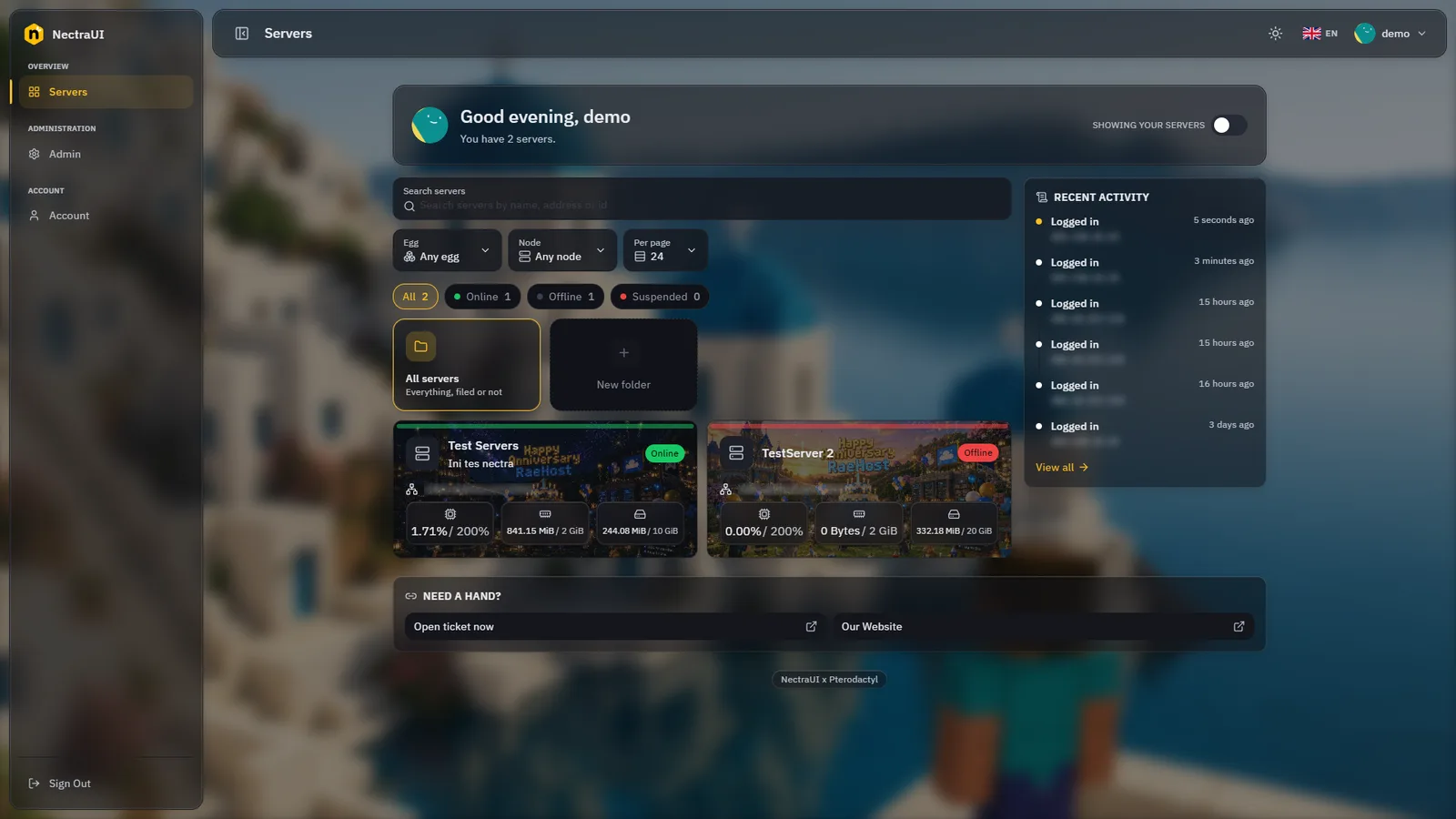
  • The published NectraUI demo panel: floating glass surfaces over a blurred photograph, with a greeting, a tile server card and a card of links
    • ShellFloating
    • MaterialSubtle
    • BackgroundPhoto
    • ModeDark

    A photo under the glass

    The published demo. A background photo washed to 60 and blurred to 10, so the surfaces still read over it.

  • The published NectraUI demo panel in light mode, the same blurred photograph behind pale glass surfaces
    • ShellFloating
    • MaterialSubtle
    • BackgroundPhoto
    • ModeLight

    Photo and light together

    The demo again with the mode flipped. The photo, the wash and the blur are the same numbers.

One theme manager, every look.

Edit the live panel from the admin. Pick a preset or set each colour, choose the chrome, the cards and the nav, then publish when it reads right.

  • Presets and colours

    Start from one of six presets or set any of the ten palette tokens by hand. Nectra derives the rest, and the preview frame is the real panel in your session.

    Presets and colours in the NectraUI theme manager
  • Chrome and card shapes

    Attached, floating or topbar chrome, four server card shapes, and a content width cap for wide screens.

    Chrome and card shapes in the NectraUI theme manager
  • Navigation styles

    Tint, solid or line for the active item. Rename, reorder or hide categories, and show a page only to the eggs you list.

    Navigation styles in the NectraUI theme manager
  • Ten bundled fonts

    Variable fonts served by the panel itself, so no request ever leaves for a font host.

    • DM Sans
    • Figtree
    • Geist
    • Google Sans
    • IBM Plex Sans
    • Inter
    • Manrope
    • Onest
    • Outfit
    • Plus Jakarta Sans
  • Eight languages

    Every client string translated, with a switcher your users reach from the topbar.

    • English
    • Bahasa Indonesia
    • Bahasa Melayu
    • Deutsch
    • Español
    • Português BR
    • 日本語
    • 中文
  • Egg banners

    A banner per egg on the server card, in Row, Tile or Panel shape, so a Paper server never looks like a Bedrock one.

  • Announcements

    A strip across the topbar or a card on the dashboard, in four tones, dismissed per user.

  • Background and glass

    Drop a panel background photo, then set the wash and blur until text stays readable. Glass off, subtle or frosted, with the scrollbar colour to match.

NectraUI dashboard in dark modeDark
NectraUI dashboard in light modeLight

One purchase, no subscription.

The theme is bought once on BuiltByBit and covers the panels you operate. Every addon is its own purchase on top of it, so you only pay for the pages your customers will open.

NectraUI Theme

Required for every addon

A full HeroUI reskin of the Pterodactyl client area, shipped pre-built, with an admin theme manager you edit live.

See price on BuiltByBit
  • Full HeroUI reskin of the client area, no frontend build
  • Admin theme manager with live preview
  • Palette editor, six presets and ten bundled fonts
  • Three chrome shapes, four card shapes and three nav styles
  • Glass on or off, panel background photo with wash and blur
  • Egg banners, announcements, dashboard card links and scrollbar colour
  • Dark and light mode
  • Eight languages
  • One command installer with dry run
  • Checksum based updates that never touch your data

Languages: English, Bahasa Indonesia, Bahasa Melayu, Deutsch, Español, Português BR, 日本語, 中文

Addons

14 addons, each sold separately

Each addon is its own purchase on BuiltByBit. Buy only the ones your customers will use, and install the theme first: every addon needs it.

  • File ManagerSee price on BuiltByBit
  • Minecraft Version ManagerSee price on BuiltByBit
  • Egg ChangerSee price on BuiltByBit
  • Plugin InstallerSee price on BuiltByBit
  • Mod InstallerSee price on BuiltByBit
  • Modpack InstallerSee price on BuiltByBit
  • Bedrock Addon InstallerSee price on BuiltByBit
  • Bedrock Config EditorSee price on BuiltByBit
  • Player ManagerSee price on BuiltByBit
  • Subdomain ManagerSee price on BuiltByBit
  • Server ImporterSee price on BuiltByBit
  • Permission ManagementSee price on BuiltByBit
  • Admin LogsSee price on BuiltByBit
  • Command HistorySee price on BuiltByBit

The theme is required for every addon. Once installed, an addon is on straight away and can be switched off from the theme editor.

Browse addons on BuiltByBit
  • One time purchase, no subscription
  • Updates skip the files you changed yourself
  • Installer with dry run and backup
  • Refunds follow BuiltByBit terms

Questions buyers ask first.

What is in the box, how installs and updates behave, and how the licence is counted.

Anything else is quickest to check yourself: open the live demo with the account demo / demo.

The full HeroUI reskin of the client area, the admin theme manager, dark and light mode, eight languages and the installer. Every addon is a separate purchase, none ships free.

Give your customers a panel worth logging into.

Open the live demo with demo / demo and click around, then buy the theme on BuiltByBit and add the addons your customers will use.

NectraUI is an independent product and is not affiliated with Pterodactyl.